
$12.99 Inc GST
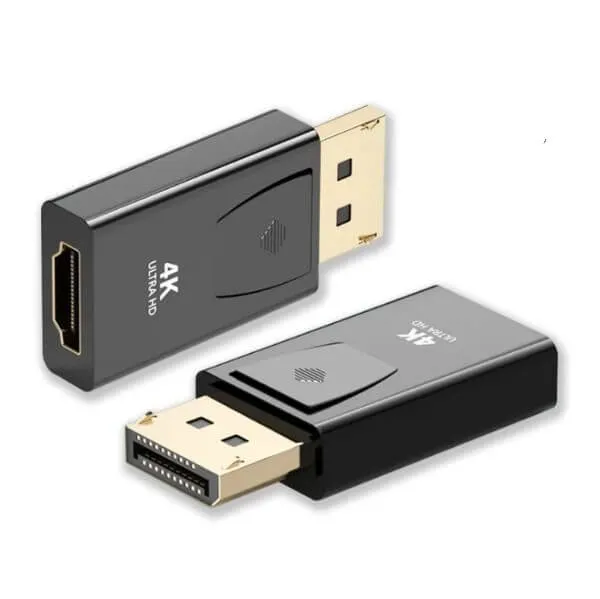
A one-piece plug that turns a DisplayPort output into an HDMI socket. No lead, no power, nothing to configure — but there is one thing to check on your computer first, and it is in the next paragraph.
This is a passive displayport to hdmi adapter. It contains no conversion chip. What it does is tell your graphics card to send an HDMI-shaped signal out of its DisplayPort socket, and then rearrange the pins so an HDMI cable can pick it up.
That only works if the DisplayPort output supports dual-mode, a feature usually written as DP++. Most desktop graphics cards and business laptops have it. Some do not — and on those, a passive adapter shows a black screen no matter how well it is made.
How to check in ten seconds: look at the DisplayPort socket on your computer. If you can see a small “DP” logo with two plus signs stacked beside it, you have dual-mode and this will work. If your only DisplayPort output is a USB-C port, a dock or a port replicator, check before you order — those are the ones that most often lack it. Send us a photo of the port and we will tell you.
4K works. 4K at 60Hz does not.
Dual-mode has a fixed speed limit built into the DisplayPort standard, and no passive adapter can exceed it. What that gives you in practice:
30Hz on a 4K desktop feels laggy when you move the mouse. It is not a fault and it is not this displayport to hdmi adapter being cheap — it is the standard, and it applies to every passive part of this type. If you need 4K at 60Hz, you need an active converter, which has a chip inside and costs more. Ask us and we will point you at one rather than sell you this.
DisplayPort output on the computer → HDMI input on the screen. That is the only way round it works.
It will not go the other way. You cannot plug an HDMI source — a console, a set-top box, a laptop with only HDMI out — into this and feed a DisplayPort monitor. Nothing passive can do that in either standard, because HDMI devices have no way to emit a DisplayPort signal. That job needs a powered converter, and it is a different part.
If that is what you are after, ask us. It is a common mix-up and the two adapters look almost identical in a photo.
A rigid one-piece body. The DisplayPort plug comes straight out of the housing with no flying lead, so the whole thing sits flat against the back of the machine and adds about four centimetres of depth. Behind a desktop tower that is usually what you want — there is no loop of cable to catch on anything.
Gold-plated contacts on both ends, which is about corrosion rather than picture quality. A plug that lives behind a computer for four years is a plug that oxidises.
Audio travels with the video. DisplayPort and HDMI both carry sound on the same wires, so your TV or monitor speakers work without a separate audio lead.
No drivers, no power, no settings. Plug the displayport to hdmi adapter in and the screen appears.
Desktop towers, where the port faces a wall and a flying lead would kink.
Monitor arms and wall mounts, for the same reason.
Meeting rooms and lecterns where an adapter lives permanently in the back of a machine and the rigid body will not get yanked out.
Where it is the wrong shape: a laptop you carry, where a rigid dongle levers against the socket every time the bag moves. For that, the short-lead version is the better buy and we stock it.
Stocked in Melbourne, not drop-shipped with a three-week wait. Order before 10am and your adapter ships the same day via Australia Post with tracking and insurance, backed by our 90-day warranty.
And by a team that will tell you when the answer is an active converter. Passive adapters are the single most-returned item in this category, almost always because nobody mentioned dual-mode or the 30Hz ceiling before the sale. We would rather spend a minute on it than process a return.
Check your port for the DP++ mark, decide whether 4K at 30Hz is enough, and order your displayport to hdmi adapter today.
Works with:
Resolutions:
One direction only. DisplayPort source to HDMI display. It will not carry an HDMI source to a DisplayPort monitor — that needs a powered converter and is a different product. Ask us.
Will not work with:
A DisplayPort output that lacks dual-mode shows no picture at all rather than a degraded one. Docking stations, port replicators and USB-C DisplayPort outputs are the common cases, and multi-monitor modes such as AMD Eyefinity and NVIDIA Surround generally require an active adapter instead — send us a photo of your port and we will confirm before you order.
Mini DisplayPort and Thunderbolt sockets do not fit this plug. The connector is full-size DisplayPort only.
Audio passes through with the video, so display speakers work without a separate lead.
Core Connect Aust is not affiliated with, endorsed by, or sponsored by VESA, HDMI Licensing Administrator, AMD, NVIDIA or Intel. DisplayPort is a trademark of VESA; HDMI is a trademark of HDMI Licensing Administrator, Inc. Used here for compatibility reference only. This is not a manufacturer-branded product.
Only logged in customers who have purchased this product may leave a review.

Reviews
There are no reviews yet.