
$9.95 Inc GST
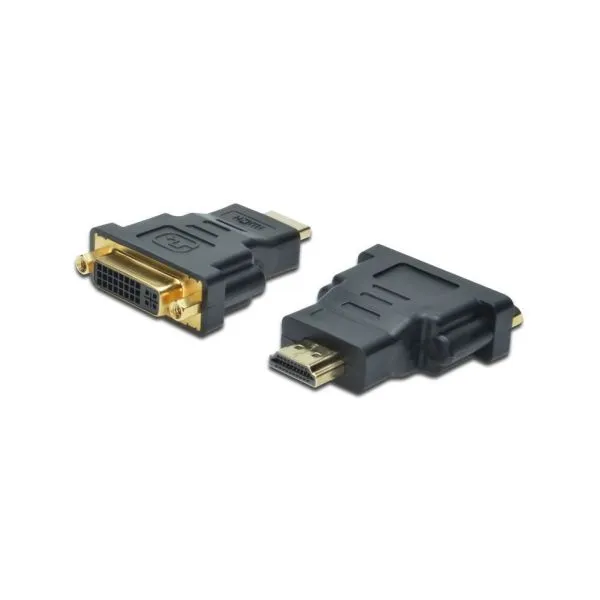
A dvi to hdmi adapter joins the two connectors that carry the same digital picture through different plugs. This one has an HDMI plug on one side and a DVI-I socket on the other, so an HDMI output reaches a monitor that only takes DVI.
The HDMI end is a plug. It goes into a socket — a laptop, a mini PC, a graphics card, a streaming stick.
The DVI end is a socket. A DVI cable goes into it, and the other end of that cable goes to the monitor.
⚠️ So a dvi to hdmi adapter of this shape does not replace a cable — it terminates one. You need a DVI male-to-male lead as well, and most old monitors came with one.
DVI and HDMI carry the same digital video signal, which is why a dvi to hdmi link needs no electronics. The wiring inside is direct — no chip, no conversion, no power.
⭐ That is why a passive dvi to hdmi adapter is reliable in a way that converters are not. Nothing to fail, nothing to plug in, nothing to overheat. If the picture appears, it will keep appearing.
DVI carries video only. There is no audio in the standard, so there is none in the adapter.
⚠️ Plug a laptop into a DVI monitor through a dvi to hdmi adapter and the picture works and the speakers do not. Windows will often switch audio to the monitor and then play nothing.
⭐ The fix is a separate 3.5mm lead from the computer to the monitor or to speakers, and setting the audio output back by hand. We will tell you which lead before you order rather than after.
Up to 1920 × 1200 at 60Hz. That is the single-link digital limit, and it is what any passive hdmi to dvi adapter can carry.
⚠️ The DVI-I socket has the extra analogue pins and accepts a dual-link cable mechanically, but neither the analogue nor the dual-link pins are connected to anything — HDMI has no equivalent for either. So a dual-link cable fits and still runs at single-link speed.
⭐ For the monitors this is actually used with — 1080p and 1200p panels from the DVI era — that ceiling is the panel’s ceiling anyway.
Protected video needs HDCP support at both ends.
⚠️ Many DVI monitors from before about 2009 have no HDCP, so a streaming stick or a Blu-ray player may show a black screen while a laptop desktop shows perfectly. A dvi to hdmi adapter cannot add it — it is in the monitor.
That it converts anything. A dvi to hdmi adapter is a passive joint. It will not turn DVI into VGA, and it will not make an analogue monitor work.
That it carries sound. Said twice on purpose, because it is the commonest disappointment with this part.
That it works in the other direction as a plug. Its DVI end is a socket; if you need a DVI plug, that is a different adapter.
This dvi to hdmi adapter is stocked in Melbourne and ready to go — order before 10am and your hdmi to dvi adapter ships the same day via Australia Post with tracking and insurance, backed by our 90-day warranty and a team who will ask what is at each end before you spend anything.
Tell us the computer and the monitor and we will say what you need. Order your dvi to hdmi adapter today.
An HDMI output at one end, and a DVI cable to a DVI monitor at the other.
⭐ And it takes a DVI-D or a DVI-I cable. The socket is DVI-I, so both fit — the digital pins are the ones doing the work either way.
It will not carry sound. DVI has no audio in the standard. Use a 3.5mm lead alongside it and set the audio output by hand — this is the commonest surprise on this part and it is worth saying twice.
It will not plug straight into a monitor. Its DVI end is a socket, so a DVI male-to-male cable is needed as well.
It will not exceed 1920 × 1200 at 60Hz. Passive HDMI-to-DVI is single link. A dual-link cable fits the socket and still runs at single-link speed, because HDMI has no dual-link pins to connect to.
It will not carry an analogue signal. The DVI-I socket has the analogue pins but nothing is wired to them — so it cannot reach a VGA monitor, with or without a further adapter.
It will not add HDCP. A DVI monitor from before roughly 2009 often has none, and protected video will show a black screen no matter what is in between.
Only logged in customers who have purchased this product may leave a review.

Reviews
There are no reviews yet.