
$39.95 Inc GST
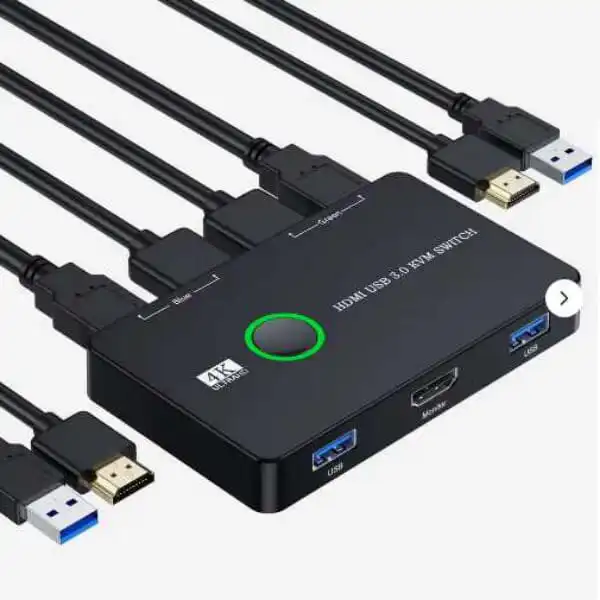
An hdmi kvm switch lets two computers share one monitor, one keyboard and one mouse, and hands the whole desk from one machine to the other at the press of one button. A work desktop and a personal one stop needing two of everything on the same desk.
Everything on the peripheral side, at once. The monitor follows the machine you have selected, and so do the keyboard and the mouse plugged into the two USB ports on the front – which is the trio the category is named after, keyboard, video, mouse. A printer, an external drive, a webcam or a card reader on those ports move with them, because a 2 port kvm switch hands over the whole front panel at once.
What it does not move is anything plugged directly into either computer. That sounds obvious and it is a common surprise: a 2 port kvm switch only hands over what is connected through it, so the webcam that lives in the back of one tower stays with that tower.
There is no software and nothing to install. An hdmi kvm switch is a physical connection, so each computer simply sees the devices appear and disappear the way it would if you had unplugged them by hand. That also means the button on an hdmi kvm switch still works when one machine is asleep or has not finished booting, which is the moment software switching tends to let you down.
This hdmi kvm switch is a single-screen product. One HDMI output goes to one monitor, and that monitor shows whichever computer is selected. If you run two screens and want both to follow the switch, you want a dual-monitor KVM instead – a different box with two video outputs, and the wrong one here is an expensive mistake rather than a small one.
On the computer side each machine connects with two leads: HDMI for the picture and USB for the keyboard, mouse and anything else on the front. Both leads have to be connected for the switching to work, which catches people out when only the HDMI goes in. An hdmi kvm switch with the USB lead missing will show the picture and ignore the keyboard entirely.
Two HDMI cables and two USB cables ship with the hdmi kvm switch. That matters more than it sounds. A 2 port kvm switch needs exactly four leads to do its job, most people have one spare at best, and the competing boxes at this price generally arrive bare. Buying a kvm switch with cables included means it works the evening it arrives rather than after another order – and the USB A-to-B lead each computer needs is the one almost nobody has in a drawer.
The case is plastic with a single illuminated button on top, and the two USB ports run at USB 3.0 speed – 5Gbps – so an external drive on the front is not throttled back to USB 2.0 the way it is on cheaper designs. A kvm switch with cables in the box and USB 3.0 on the front is not the usual pairing at this price. The button on a 2 port kvm switch lights to show which machine has the desk, which you glance at rather than work out.
Any two computers with an HDMI output and a spare USB port – Windows, macOS or Linux, in any combination. An hdmi kvm switch with no drivers has nothing to be incompatible with, and because it is a switch rather than a dock, neither machine needs to support anything in particular.
Compatible with:
Core Connect Aust is not affiliated with, endorsed by, or sponsored by Microsoft, Apple or any computer maker. All brand and model names are trademarks of their respective owners and are used here for compatibility reference only. This is an aftermarket accessory, not a product of any device maker.
This hdmi kvm switch is stocked in Melbourne – order before 10am and your 2 port kvm switch ships the same day via Australia Post with insurance, backed by our 180-day warranty and a team who can confirm it suits both machines before you order.
Two computers, one desk, one button. This hdmi kvm switch ships from Melbourne the same day you order
Only logged in customers who have purchased this product may leave a review.

Reviews
There are no reviews yet.