Price range: $4.79 through $7.99 Inc GST
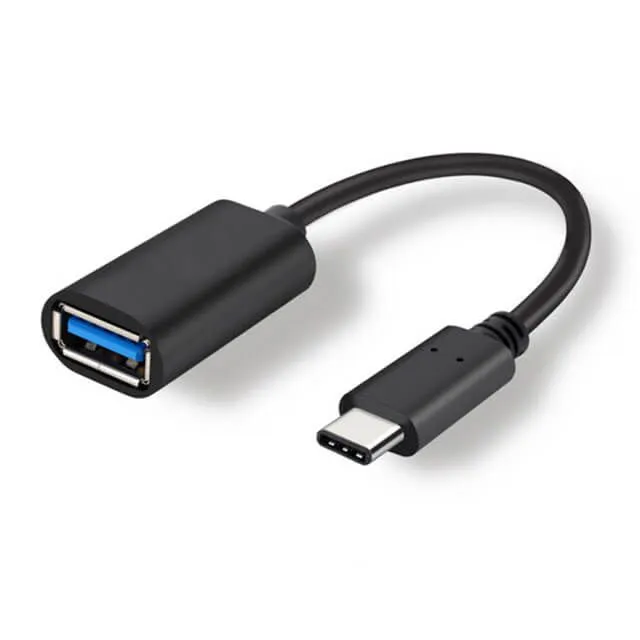
A usb c otg adapter on a short flexible lead: a USB-C plug at one end, a full-size USB-A socket at the other. It lets a phone, tablet or laptop read a flash drive, a card reader, a keyboard or a mouse.
OTG is On-The-Go, and it is a feature of your DEVICE, not of the adapter.
Normally a phone is the thing being plugged in. OTG is the mode where the phone becomes the host — it supplies power and gives orders, the way a computer does. Without that mode nothing happens, and no adapter can add it.
A usb c otg adapter simply provides the socket; the device decides whether anything happens in it.
The good news is that nearly everything modern has it. Android phones and tablets have supported OTG for over a decade; iPads with USB-C support it; laptops are hosts by definition.
⚠️ The exception worth naming is older or very cheap Android phones, where OTG was sometimes left out to save a few cents. If a flash drive does nothing when you plug it in, the phone is the thing to check, not the otg adapter.
⚠️ What it struggles with is anything hungry. A bus-powered 2.5-inch spinning hard drive frequently will not start from a phone’s OTG port — the phone simply does not supply enough current. An SSD usually will. This is the commonest reason an otg adapter looks faulty when it is not.
480Mbps is USB 2.0. Fine for a keyboard, a mouse, a controller, a MIDI keyboard or moving a few photos.
5Gbps is USB 3.x — ten times faster, and worth it the moment a large file is involved. Moving 20GB of video off a card at 480Mbps takes about six minutes; at 5Gbps it takes under one.
⭐ The honest guidance: if it is an input device, buy the cheaper one. If it is storage, buy the faster one. Nothing else about the two is different — same shell, same lead, same socket, and the otg adaptor you end up with looks identical either way.
⚠️ And the speed you get is the slowest link in the chain. A 5Gbps usb c otg adapter with a USB 2.0 flash drive on the end runs at USB 2.0.
This one is a short lead rather than a solid block.
That matters when whatever you are plugging in is heavy or thick. A chunky flash drive hanging off a rigid adapter is a lever on the phone’s USB-C port, and that port is soldered to the board. The flexible lead takes the strain instead.
A rigid stub is neater for something small and light, and the catalogue stocks one of those too — the choice is about what you are hanging off it, not about quality.
Neither form is better made than the other. A pigtail usb c otg adapter is the right answer for a thick flash drive or an anything-with-a-cable; a stub is the right answer for a small wireless receiver you leave in permanently.
The USB-C plug goes into the phone, tablet or laptop. On a laptop the same otg adapter simply becomes a USB-C to USB-A adapter, which is the more common use once the device is a computer rather than a phone. No mode, no setting — a laptop is always a host.
This usb c otg adapter is stocked in Melbourne and ready to go — order before 10am and your otg adaptor ships the same day via Australia Post with insurance, backed by our 90-day warranty and a team who can confirm your device supports OTG before you order.
Stocked here, not shipped from overseas. Order your usb c otg adapter today and get at the files on the drive.
Works with any device that has a USB-C port and supports USB OTG host mode, including:
At the other end: a full-size USB-A socket, so flash drives, card readers, keyboards, mice, controllers, MIDI keyboards, audio interfaces, Ethernet adapters and printers.
⚠️ OTG is a feature of the device, not the adapter. A phone that does not support host mode will do nothing when something is plugged in, and no adapter can change that. Most modern devices support it; some older and budget Android phones do not.
⚠️ High-draw devices may not start. A bus-powered 2.5-inch spinning hard drive often needs more current than a phone supplies. An SSD usually works; a spinning drive is the one to test.
Speed runs at the slowest link — a 5Gbps adapter with a USB 2.0 drive gives USB 2.0.
Device and brand names above are used only to describe what the adapter works with.
Only logged in customers who have purchased this product may leave a review.


Reviews
There are no reviews yet.