$19.95 Inc GST
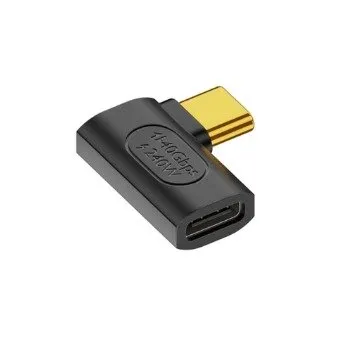
A usb c right angle adapter solves a problem that only exists once you have met it: the cable sticks straight out of the laptop, catches on the desk edge, and slowly levers the port. Turn the plug through ninety degrees and the lead runs flat along the side of the machine instead.
Three situations, and most people buying one are in the first.
The port that gets knocked. A cable protruding from the side of a laptop is the part that catches on a bag strap, a chair arm or your own knee. USB-C ports are soldered to the board, and the force goes straight into that joint. A right angle usb c adapter turns a lever into a hinge.
The gap that is too small. Behind a monitor arm, inside a media cabinet, in a car dash cubby or against a wall where the socket sits two centimetres from the plasterboard. A usb c right angle adapter buys back the two or three centimetres a straight plug wastes.
The handheld held in two hands. Steam Deck, ROG Ally, Switch — charging while playing means a cable where your fingers are. With a right angle usb c adapter fitted, the lead runs under the device instead of into your palm.
The usb c right angle adapter plugs into the device and your existing cable plugs into the adapter. Nothing is replaced. That is the difference between this and buying an angled cable: a right angle usb c adapter costs twenty dollars once and travels with you, and works with whatever lead you already own.
A usb c right angle adapter is also reversible in the sense that matters — take it off and you are back to a normal port, with nothing left glued in place.
A usb c right angle adapter passes up to 100W — 20V at 5A, which is laptop territory. What the adapter cannot do is create power: the charger sets the maximum and the cable has to be e-marked for 5A to carry it. A 3A lead through this adapter gives you 60W, exactly as it would without the adapter in the way. If your laptop charges slowly through a usb c right angle adapter, check the cable before you blame the angle.
This usb c 90 degree adapter is passive — copper and shielding, no chips — and it adds a second mated connector pair to the link.
Plan around USB 3.2 Gen 2, which is 10Gbps. That is what a passive pass-through delivers dependably, and for an external SSD, a dock or a display it is plenty.
It will carry USB4 and Thunderbolt 3 signalling, and it may reach 40Gbps — but whether it does depends on your host, your cable and the total length of the run, and no adapter of any kind guarantees it. A ninety-degree bend is exactly where the impedance control that 40Gbps needs gets difficult. If you are running a Thunderbolt dock at full rate and it matters, put the angle in the cable rather than in an adapter.
And one thing worth knowing: Thunderbolt and USB4 certification programmes test hosts, docks, devices and cables. They do not test adapters inserted mid-link. Anybody selling a “certified” USB4 adapter is quoting a programme that does not cover the product. We would rather say so than repeat it.
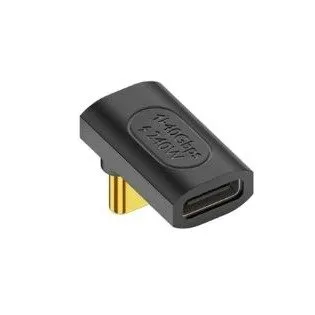
This usb c 90 degree adapter comes in three, so the angle points the way your setup needs rather than the way the moulding happened to go. Check the variation before you order — the direction of the bend is the whole purchase here, and getting it upside down means the cable fouls the thing you were trying to avoid.
Stocked in Melbourne, not drop-shipped. Order before 10am and your usb c 90 degree adapter ships the same day via Australia Post with tracking and insurance, backed by our 90-day warranty and a team who will tell you when an angled cable is the better answer than an adapter.
Stop levering the port. Order your usb c right angle adapter today.
Fits any USB-C port, because it is a straight pass-through:
Male into the device, female for your cable. The adapter goes into the port and your existing lead goes into the adapter. There is nothing to install and nothing to configure.
Charging: up to 100W (20V/5A) passed through. The adapter does not generate power — the charger and the cable set the ceiling, and 100W needs a cable e-marked for 5A. A 3A lead through this adapter gives you 60W, exactly as it would without it.
Data: what the chain agrees. The adapter is passive and adds a mated connector pair to the link. USB 3.2 Gen 2 speeds (10Gbps) are the figure to plan around; higher rates depend on your host, your cable and the total run, and no adapter can guarantee them. See the note in the specifications.
One thing worth knowing about certification. Thunderbolt and USB4 certification programmes test hosts, docks, devices and cables — they do not cover adapters inserted in the middle of a link. Anything sold as a “certified” USB4 adapter is describing a programme that does not test that product class. We would rather tell you that than repeat it.
Core Connect Aust is not affiliated with, endorsed by, or sponsored by Apple, Dell, Lenovo, Microsoft, Samsung, Google, Valve, ASUS, Nintendo, Intel or USB-IF. All brand and model names are trademarks of their respective owners, used here for compatibility reference only. This is not a manufacturer-branded product.
Only logged in customers who have purchased this product may leave a review.


Reviews
There are no reviews yet.